
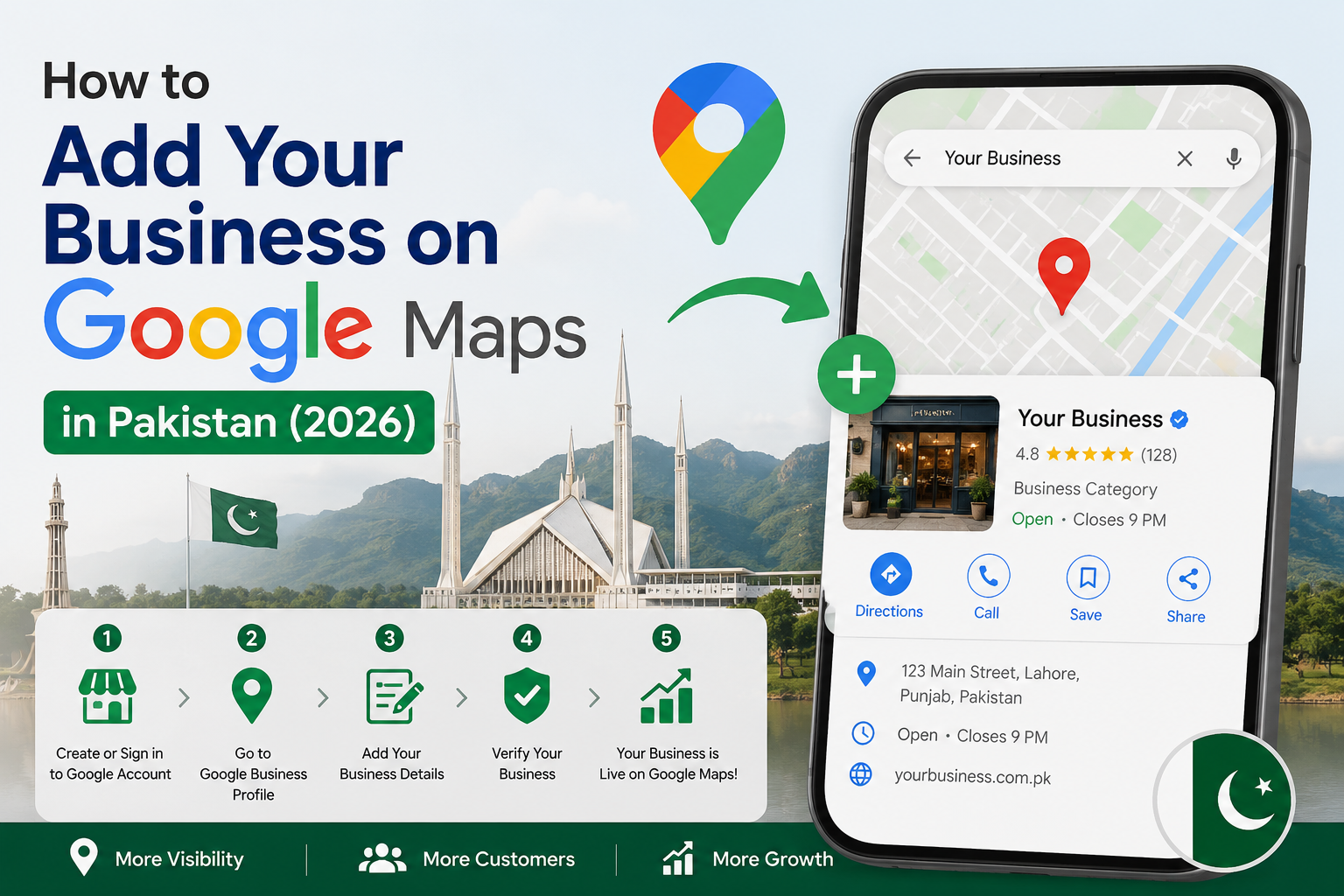
How to Add Your Business on Google Maps in Pakistan — Step-by-Step 2026 Guide
𝗛𝗼𝘄 𝘁𝗼 𝗔𝗱𝗱 𝗬𝗼𝘂𝗿 𝗕𝘂𝘀𝗶𝗻𝗲𝘀𝘀 𝗼𝗻 𝗚𝗼𝗼𝗴𝗹𝗲 𝗠𝗮𝗽𝘀 𝗶𝗻 𝗣𝗮𝗸𝗶𝘀𝘁𝗮𝗻 — 𝗦𝘁𝗲𝗽-𝗯𝘆-𝗦𝘁𝗲𝗽 𝟮𝟬𝟮𝟲 𝗚𝘂𝗶𝗱𝗲
Let me ask you something honest. When was the last time you searched for a business on Google and actually scrolled past the map results? Almost never, right? You clicked one of the top three, checked the reviews, grabbed the number, and called. That's exactly what your customers are doing right now — and if your business isn't on Google Maps, someone else is getting that call.
The good news? Getting listed is completely free. It takes about 15 minutes to set up, and even a basic, well-filled listing can start bringing in local enquiries within a few weeks. This guide will walk you through every single step — from creating your profile to getting it verified and optimised — specifically for Pakistani businesses in 2026.
Whether you're running a fan manufacturing unit in Gujranwala, a leather goods export firm in Sialkot, a medical clinic in Islamabad, or a clothing boutique in Lahore — this is written for you.
𝗧𝗮𝗯𝗹𝗲 𝗼𝗳 𝗖𝗼𝗻𝘁𝗲𝗻𝘁𝘀
1. Why Google Maps Matters More Than Ever for Pakistani Businesses
2. What You Need Before You Start
3. Step-by-Step: How to Add Your Business on Google Maps
3.1 Create or Sign In to Your Google Account
3.2 Go to Google Business Profile
3.3 Enter Your Business Name
3.4 Choose the Right Business Category
3.5 Add Your Location Details
3.6 Add Contact Information and Website
3.7 Verify Your Business
4. How to Optimise Your Listing After Verification
5. What Pakistani Businesses Get Wrong (And How to Fix It)
6. Quick Comparison: Verified vs Unverified Listing
7. FAQ
8. Final Thoughts + Next Step
𝟭. 𝗪𝗵𝘆 𝗚𝗼𝗼𝗴𝗹𝗲 𝗠𝗮𝗽𝘀 𝗠𝗮𝘁𝘁𝗲𝗿𝘀 𝗠𝗼𝗿𝗲 𝗧𝗵𝗮𝗻 𝗘𝘃𝗲𝗿 𝗳𝗼𝗿 𝗣𝗮𝗸𝗶𝘀𝘁𝗮𝗻𝗶 𝗕𝘂𝘀𝗶𝗻𝗲𝘀𝘀𝗲𝘀
Here's a stat that should stop you in your tracks. Over 65% of Google searches in 2025 ended without a single click to any website — meaning users found what they needed directly from Google's results, including the map panel. Phone number, hours, address — grabbed and gone. If your business isn't there, you simply don't exist for those searchers.
Pakistan's internet landscape has shifted dramatically. Mobile internet users crossed 120 million in 2025. People in Gujranwala, Faisalabad, and Sialkot are searching "AC repair near me" and "clothing shop open now" from their phones every single day. The Map Pack — those three highlighted businesses that appear alongside a map at the top of local search results — gets the majority of those clicks.
In Pakistan, this platform is still widely searched as Google My Business Pakistan — and whether you call it GMB or Google Business Profile, setting it up correctly is what separates businesses that get calls from those that don't.
Here's what makes this even more relevant in 2026: Google's AI-generated answers are now pulling directly from Google Business Profiles. When someone asks Google AI "best garments supplier in Sialkot," the businesses it names are the ones with complete, active listings. This is no longer just a listing — it's your digital storefront inside Google's entire ecosystem.
And unlike paid ads, this visibility costs you nothing once you're set up. That's a significant advantage for small and medium businesses across Pakistan who can't afford to run ads every month.
𝟮. 𝗪𝗵𝗮𝘁 𝗬𝗼𝘂 𝗡𝗲𝗲𝗱 𝗕𝗲𝗳𝗼𝗿𝗲 𝗬𝗼𝘂 𝗦𝘁𝗮𝗿𝘁
Before you open Google Business Profile, gather these things. Having them ready makes the whole process take 15 minutes instead of an hour.
• A Google account (Gmail) — create one for free if you don't have one linked to your business
• Your exact business name as it appears on your signboard, website, or receipts
• Your business address or service area (if you go to customers rather than them coming to you)
• A working Pakistani phone number — this is how customers will call you
• Your business hours, including Friday and public holiday schedules
• A brief description of what your business actually does — you will write this later, but have the basics in mind
• A few photos — exterior, interior, and product or service shots if you have them
One important note: if your business is home-based or you prefer not to publish your exact address, Google allows you to set a service area instead. You can serve Gujranwala and surrounding districts without showing your home on the map. This is particularly useful for freelancers, consultants, and home-based businesses.
𝟯. 𝗦𝘁𝗲𝗽-𝗯𝘆-𝗦𝘁𝗲𝗽: 𝗛𝗼𝘄 𝘁𝗼 𝗔𝗱𝗱 𝗬𝗼𝘂𝗿 𝗕𝘂𝘀𝗶𝗻𝗲𝘀𝘀 𝗼𝗻 𝗚𝗼𝗼𝗴𝗹𝗲 𝗠𝗮𝗽𝘀
𝟯.𝟭 𝗖𝗿𝗲𝗮𝘁𝗲 𝗼𝗿 𝗦𝗶𝗴𝗻 𝗜𝗻 𝘁𝗼 𝗬𝗼𝘂𝗿 𝗚𝗼𝗼𝗴𝗹𝗲 𝗔𝗰𝗰𝗼𝘂𝗻𝘁
Go to gmail.com and sign in. If you're creating a new account for your business, use something professional — yourname@gmail.com or yourbusinessname@gmail.com. Avoid usernames that look unprofessional, because this account will be linked to your public business listing.
𝟯.𝟮 𝗚𝗼 𝘁𝗼 𝗚𝗼𝗼𝗴𝗹𝗲 𝗕𝘂𝘀𝗶𝗻𝗲𝘀𝘀 𝗣𝗿𝗼𝗳𝗶𝗹𝗲
Visit business.google.com and click "Manage now." This is Google's official platform — previously known as Google My Business Pakistan users have been using since 2014. The name changed but the process is the same.
𝟯.𝟯 𝗘𝗻𝘁𝗲𝗿 𝗬𝗼𝘂𝗿 𝗕𝘂𝘀𝗶𝗻𝗲𝘀𝘀 𝗡𝗮𝗺𝗲
Type your business name exactly as it appears in real life. This is critical. Adding keywords to your business name — like writing "Best Fan Manufacturer Gujranwala" instead of just your actual business name — violates Google's guidelines and can get your listing suspended. Use your real name. The location and category fields handle the rest.
If your name appears in the autocomplete dropdown, it means a listing already exists for your business — this happens more often than you'd think, someone may have created it years ago. Click it and choose "Claim this business" instead of creating a duplicate.
𝟯.𝟰 𝗖𝗵𝗼𝗼𝘀𝗲 𝘁𝗵𝗲 𝗥𝗶𝗴𝗵𝘁 𝗕𝘂𝘀𝗶𝗻𝗲𝘀𝘀 𝗖𝗮𝘁𝗲𝗴𝗼𝗿𝘆
This is the single most important ranking decision you'll make. Google uses your primary category to decide which searches to show your business for. Be specific, not broad.
• Don't choose "Shop" — choose "Clothing Store" or "Textile Shop"
• Don't choose "Manufacturer" — choose "Fan Manufacturer" or "Surgical Instruments Manufacturer"
• Don't choose "Doctor" — choose "Dermatologist" or "General Practitioner"
You can add up to nine secondary categories later, but your primary category carries the most weight. Spend 2 minutes searching for the most accurate option available.
𝟯.𝟱 𝗔𝗱𝗱 𝗬𝗼𝘂𝗿 𝗟𝗼𝗰𝗮𝘁𝗶𝗼𝗻 𝗗𝗲𝘁𝗮𝗶𝗹𝘀
If customers come to your premises, select "Yes, I have a physical location" and enter your full address. Be as accurate as possible. Google will later allow you to drag a pin on the map if your street isn't fully mapped — which happens in many areas of Gujranwala, Sialkot, and smaller Pakistani cities.
If you go to customers — like a home services business, consultant, or delivery-based shop — choose "I deliver goods and services to my customers" and set your service area by city or region. You can list multiple cities, for example Gujranwala, Hafizabad, and Wazirabad if that's your actual coverage.
𝟯.𝟲 𝗔𝗱𝗱 𝗖𝗼𝗻𝘁𝗮𝗰𝘁 𝗜𝗻𝗳𝗼𝗿𝗺𝗮𝘁𝗶𝗼𝗻 𝗮𝗻𝗱 𝗪𝗲𝗯𝘀𝗶𝘁𝗲
Enter a phone number that you actually answer. This seems obvious, but many businesses enter a number that goes unanswered or to a WhatsApp-only line that isn't linked properly. If you have a website, add it here. If you don't have one yet, a team like MZ Digital at mzdigital.pk can build you a professional business website that connects directly with your Google profile — but even without a website, your listing works perfectly.
𝟯.𝟳 𝗩𝗲𝗿𝗶𝗳𝘆 𝗬𝗼𝘂𝗿 𝗕𝘂𝘀𝗶𝗻𝗲𝘀𝘀
This is the step most people find frustrating, but it's non-negotiable. Unverified listings rank poorly and look suspicious to customers. Google needs to confirm you actually operate at the location you've listed.
In 2026, Google primarily uses video verification for new listings in Pakistan. Here's exactly what to do:
1. Record a short continuous video — do not stop or edit it mid-way
2. Start outside your premises and show any visible signage, the entrance, and your street
3. Walk inside and show the interior — products, workspace, or equipment
4. End with a live action on your device, like logging in to the Google Business Profile dashboard, to prove you're the owner
The video doesn't need to be professional quality. Natural lighting, a phone camera, and one continuous take is all Google wants. They're checking that the business is real and that you're the person managing it.
Some businesses in Pakistan still receive a postcard by mail — this typically takes 5 to 14 days and contains a PIN you enter in your dashboard. If you're offered video verification, choose that — it's much faster.
𝟰. 𝗛𝗼𝘄 𝘁𝗼 𝗢𝗽𝘁𝗶𝗺𝗶𝘀𝗲 𝗬𝗼𝘂𝗿 𝗟𝗶𝘀𝘁𝗶𝗻𝗴 𝗔𝗳𝘁𝗲𝗿 𝗩𝗲𝗿𝗶𝗳𝗶𝗰𝗮𝘁𝗶𝗼𝗻
Getting listed is step one. Getting found is step two. Here's what to do immediately after your listing goes live.
Write a proper business description. You get 750 characters. Use the first 250 wisely — describe what you do, who you serve, and where you're located. Include the names of nearby landmarks or areas if relevant. Don't stuff keywords, but do write naturally — "fan manufacturer serving wholesale buyers across Punjab" is both accurate and helpful.
Add photos consistently. Listings with photos receive significantly more direction requests and website clicks than those without. Upload at least five photos when you launch — exterior, interior, team, products or services, and one showing your signboard clearly. Then add new photos monthly. Fresh visual content signals an active business.
If your website is on WordPress, install Rank Math or Yoast SEO — both automatically add LocalBusiness schema markup to your site, which helps Google connect your website to your Maps listing and improves your chances of appearing in AI-generated search answers in 2026.
Set your hours accurately and update them for Eid, public holidays, and Ramadan. A customer who shows up to find you closed after Google said you were open will leave a one-star review. It's that simple.
Use the Posts feature. Google lets you publish updates, offers, and announcements directly on your profile — like a mini social feed. Post something at least once a week. A sale announcement, a new product, or even a simple "We're open this Eid" message keeps your profile active and feeds Google's freshness signals.
Start collecting reviews. This is the fastest way to outrank competitors who've been listed longer than you. Ask satisfied customers directly — a simple WhatsApp message that says "Can you leave us a quick Google review? It really helps us" with a link to your review page works extremely well. Aim for a steady flow of 2 to 3 new reviews every month rather than a sudden burst.
If you're a Sialkot-based exporter or B2B business, also check out our guide on digital marketing for Sialkot businesses at mzdigital.pk/cities/sialkot — local search behaviour in Sialkot has specific patterns that are worth understanding for exporters targeting both local and international buyers.
𝟱. 𝗪𝗵𝗮𝘁 𝗣𝗮𝗸𝗶𝘀𝘁𝗮𝗻𝗶 𝗕𝘂𝘀𝗶𝗻𝗲𝘀𝘀𝗲𝘀 𝗚𝗲𝘁 𝗪𝗿𝗼𝗻𝗴 (𝗔𝗻𝗱 𝗛𝗼𝘄 𝘁𝗼 𝗙𝗶𝘅 𝗜𝘁)
After working with SMEs across Gujranwala, Sialkot, Lahore, and Karachi, the team at MZ Digital sees the same mistakes come up again and again.
Keyword stuffing in the business name. Writing "Best AC Repair Lahore — Cheap Service" instead of your actual business name gets listings suspended. Google is stricter about this than ever in 2026.
Ignoring the Q&A section. Google allows anyone — including your competitors — to ask and answer questions on your listing. Log in and populate this section yourself. Ask and answer the five most common questions your customers have. Control the narrative.
Never responding to reviews. Google's algorithm rewards businesses that engage. When someone leaves a review — positive or negative — respond within 24 to 48 hours. A thoughtful response to a bad review often impresses potential customers more than the review itself damages you.
Listing a landline as the primary number. In Pakistan, most local searches end in a WhatsApp message or mobile call. If you have a business mobile number, use it as your primary contact.
Setting it up and leaving it. Your listing is not a one-time task. Businesses that update regularly — new photos, weekly posts, responding to reviews — consistently outrank businesses with older but stale profiles.
NAP mismatch across platforms. Your business name, address, and phone number must be identical everywhere — Google Business Profile, your website, Facebook, and Instagram. Even a small difference like writing "Gujranwala, Punjab" in one place and "Gujranwala, Pakistan" in another creates a trust gap that quietly hurts your ranking.
𝟲. 𝗤𝘂𝗶𝗰𝗸 𝗖𝗼𝗺𝗽𝗮𝗿𝗶𝘀𝗼𝗻: 𝗩𝗲𝗿𝗶𝗳𝗶𝗲𝗱 𝘃𝘀 𝗨𝗻𝘃𝗲𝗿𝗶𝗳𝗶𝗲𝗱 𝗟𝗶𝘀𝘁𝗶𝗻𝗴
Here's what changes when your listing is properly verified and optimised versus one that's just been created and left alone.
Feature Basic (Unverified/Empty) Verified and Optimised
Appears in Map Pack (top 3) Rarely Regularly
Customer trust signal Low High (reviews visible)
Shows in AI search answers No Yes (2026 feature)
Direction requests Minimal Significantly higher
WhatsApp and call conversions Low Noticeably higher
Competitor advantage None Strong in local area
Monthly effort required Zero 30 minutes
𝟳. 𝗙𝗿𝗲𝗾𝘂𝗲𝗻𝘁𝗹𝘆 𝗔𝘀𝗸𝗲𝗱 𝗤𝘂𝗲𝘀𝘁𝗶𝗼𝗻𝘀
𝗜𝘀 𝗚𝗼𝗼𝗴𝗹𝗲 𝗕𝘂𝘀𝗶𝗻𝗲𝘀𝘀 𝗣𝗿𝗼𝗳𝗶𝗹𝗲 𝗳𝗿𝗲𝗲 𝗳𝗼𝗿 𝗣𝗮𝗸𝗶𝘀𝘁𝗮𝗻𝗶 𝗯𝘂𝘀𝗶𝗻𝗲𝘀𝘀𝗲𝘀?
Completely free. There is no charge to create, verify, or manage your listing. Google offers this because having accurate local business data makes their Maps and Search products more useful — it benefits both sides.If you've been searching for "Google My Business Pakistan" — this is exactly the same tool, just updated with a new name in 2022.
𝗠𝘆 𝗰𝗶𝘁𝘆 𝗼𝗿 𝘀𝘁𝗿𝗲𝗲𝘁 𝗶𝘀𝗻'𝘁 𝗼𝗻 𝗚𝗼𝗼𝗴𝗹𝗲 𝗠𝗮𝗽𝘀 𝘆𝗲𝘁. 𝗪𝗵𝗮𝘁 𝗱𝗼 𝗜 𝗱𝗼?
This is more common in smaller cities and newer residential areas. During setup, Google lets you place a pin manually on the map even if your exact address isn't in the database. Place it as accurately as you can. Over time, as more users interact with your location, the mapping improves. You can also submit missing roads through Google Maps directly.
𝗛𝗼𝘄 𝗹𝗼𝗻𝗴 𝗱𝗼𝗲𝘀 𝗶𝘁 𝘁𝗮𝗸𝗲 𝘁𝗼 𝗿𝗮𝗻𝗸 𝗼𝗻 𝗚𝗼𝗼𝗴𝗹𝗲 𝗠𝗮𝗽𝘀 𝗶𝗻 𝗣𝗮𝗸𝗶𝘀𝘁𝗮𝗻?
In less competitive categories and smaller cities, businesses often see meaningful visibility within 2 to 4 weeks of verifying and optimising their listing. In highly competitive categories in Karachi or Lahore, it typically takes 2 to 4 months of consistent effort — regular posts, photo uploads, and review gathering.
𝗖𝗮𝗻 𝗜 𝗮𝗱𝗱 𝗺𝘆 𝗯𝘂𝘀𝗶𝗻𝗲𝘀𝘀 𝗼𝗻 𝗚𝗼𝗼𝗴𝗹𝗲 𝗠𝗮𝗽𝘀 𝘄𝗶𝘁𝗵𝗼𝘂𝘁 𝗮 𝘄𝗲𝗯𝘀𝗶𝘁𝗲?
Yes. A website is not required. Your Google Business Profile functions perfectly without one — customers can still call you, get directions, read reviews, and message you directly. That said, having a professional website does strengthen your overall Google ranking and builds client trust, especially for B2B businesses and service providers.
𝗪𝗵𝗮𝘁 𝗶𝗳 𝗺𝘆 𝗯𝘂𝘀𝗶𝗻𝗲𝘀𝘀 𝘄𝗮𝘀 𝗮𝗹𝗿𝗲𝗮𝗱𝘆 𝗹𝗶𝘀𝘁𝗲𝗱 𝗯𝘆 𝘀𝗼𝗺𝗲𝗼𝗻𝗲 𝗲𝗹𝘀𝗲?
This happens frequently. Search for your business name on Google Maps. If a listing exists, click "Claim this business" and follow the verification steps to take ownership. Google will guide you through proving you're the actual owner.
𝗜 𝘀𝗲𝘁 𝘂𝗽 𝗺𝘆 𝗹𝗶𝘀𝘁𝗶𝗻𝗴 𝗺𝗼𝗻𝘁𝗵𝘀 𝗮𝗴𝗼 𝗯𝘂𝘁 𝗜'𝗺 𝗻𝗼𝘁 𝘀𝗵𝗼𝘄𝗶𝗻𝗴 𝘂𝗽. 𝗪𝗵𝘆?
Usually one of three reasons: the listing is unverified, the business category is too broad, or the profile hasn't been actively maintained. Log in, check your verification status first. Then review your primary category and make sure your description, photos, and hours are complete. Start posting weekly updates and actively request reviews from recent customers. Visibility typically improves within 30 to 60 days of consistent activity.
𝟴. 𝗙𝗶𝗻𝗮𝗹 𝗧𝗵𝗼𝘂𝗴𝗵𝘁𝘀 + 𝗡𝗲𝘅𝘁 𝗦𝘁𝗲𝗽
Google Maps isn't optional anymore — it's where Pakistani customers make decisions. They search, they check reviews, they call the business that looks most credible. That credibility is built through a complete, active, verified listing. And the best part is that your competitors in Gujranwala, Sialkot, and across Pakistan are still getting this wrong.
Setting up the listing takes 15 minutes. Optimising it properly takes another hour. Maintaining it takes about 30 minutes a month. For most Pakistani SMEs, that time investment returns more qualified local enquiries than a paid campaign ever would — and it compounds over time.
If you'd rather have it done professionally — including video verification assistance, category research, description writing, and full profile optimisation — the team at MZ Digital handles Google Business Profile setup and local SEO for businesses across Pakistan. Visit mzdigital.pk/contact or WhatsApp us directly and we'll tell you exactly where your current listing stands and what it needs.
Your next customer is already searching. Make sure they find you.
Not sure where to start? MZ Digital helps Pakistani businesses set up and optimise their Google presence — just drop a message on WhatsApp. 0321-6470878
Tags: Google Maps Pakistan, Google Business Profile Pakistan, local SEO Pakistan, Google My Business 2026, how to add business Google Maps, GMB Pakistan, Gujranwala business listing, Sialkot local SEO, Google Maps setup Pakistan, digital marketing Pakistan, local search Pakistan, small business Pakistan, Google Maps 2026